Video game backlog tracker
Make your backlog useful again
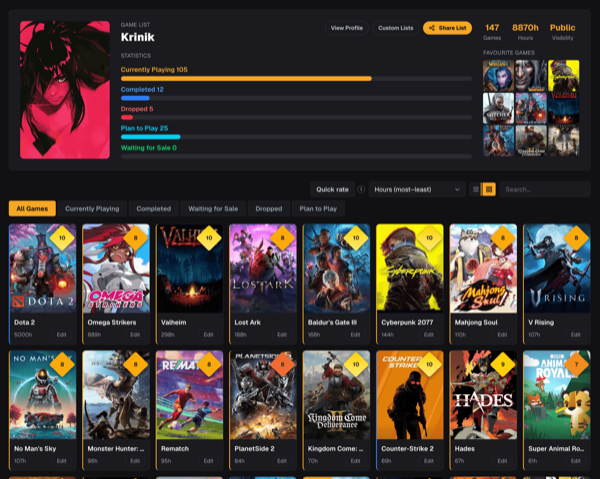
Keep every game you are playing, pausing, finishing or saving for later in one cross-platform list. GamingList replaces scattered libraries and forgotten spreadsheets with a backlog you can actually maintain.
01
Statuses that match how people really play
Separate Currently Playing, Paused and Replaying instead of forcing every started game into one bucket. Completed, Dropped, Plan to Play and Waiting for Sale keep the rest of your backlog honest.
02
One collection across every platform
Track PC, Steam, Xbox, PlayStation, Nintendo and older consoles together. Record the platform and hours on each entry without making separate lists for every storefront.
03
Fast enough for a large library
Import Steam, Xbox or PlayStation games, use Quick rate to update scores and statuses with one click, then filter and sort the collection when you need to decide what comes next.
04
A permanent record, not another storefront
Your list remains useful when you switch consoles. Ratings, reviews, hours, completion history and personal notes stay connected to your profile.
How it works
Step 1
Import or add games
Bring in a Steam, Xbox or PlayStation library, or search the catalog and add titles manually.
Step 2
Set the real status
Mark each game as playing, paused, completed, dropped or something you plan to play.
Step 3
Rate and share
Add scores and reviews, then keep the list private or share it through your gaming profile.
Questions players ask
The practical details before you move your backlog into one place.
Can I import an existing game library?+
Steam, Xbox and PlayStation imports are supported. Imported games appear in your main list and can then be organized, rated and reviewed like manually added games.
Can I keep my backlog private?+
Yes. Profiles can be public, unlisted or private. Unlisted pages work through a direct link, while private profiles remain visible only to their owner.
Does GamingList track completion dates?+
Yes. New completions receive an exact completion date. Older completed entries can be represented as estimated history when that is the only date available.
Can I create smaller themed lists too?+
Yes. Your main backlog is separate from custom ranked lists such as favorite RPGs, co-op games or anything else you want to curate.
Your backlog deserves one reliable home
Start with a few games or import a whole library. You can refine the details over time.