Steam game tracker
Turn a Steam library into a backlog you can manage
Connect a public Steam profile to bring owned games and playtime into GamingList. Then organize the library with useful statuses, ratings and reviews—and keep console games beside it.
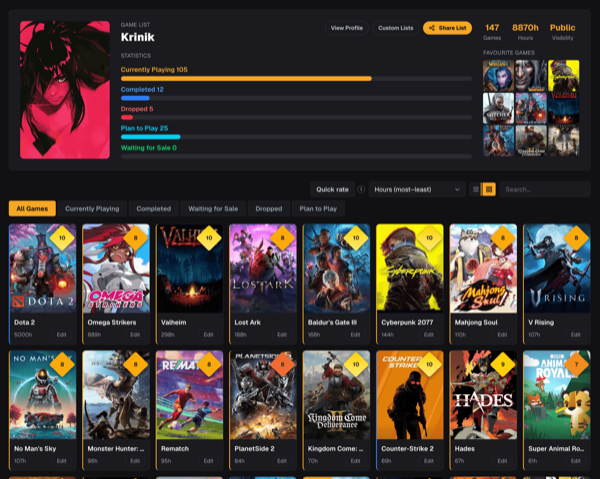
01
Import instead of adding every game by hand
GamingList matches Steam titles to the shared game catalog and adds them to your main list without overwriting entries you have already organized.
02
Use activity to create a useful starting point
Untouched imports begin as Plan to Play, recently played games can begin as Currently Playing, and older played titles can begin Paused. You remain in control of the final status.
03
Keep Steam hours beside personal ratings
Imported playtime sits with your score, review, sub-ratings and completion state, making a large library easier to sort and update.
04
Combine Steam with the rest of your gaming life
Add Xbox, PlayStation, Nintendo and other games to the same profile instead of treating Steam as your entire gaming identity.
How it works
Step 1
Connect Steam
Use Steam sign-in from profile settings and make sure the game details on the Steam profile are public.
Step 2
Run the import
GamingList matches owned titles, preserves existing entries and brings in available playtime.
Step 3
Clean up quickly
Use Quick rate and one-click statuses to organize the imported library without editing every game individually.
Questions players ask
The practical details before you move your backlog into one place.
Will a Steam import overwrite my ratings?+
No. Existing list entries are preserved rather than replaced by a later import.
Why are some Steam games not matched?+
Names and editions differ between Steam and the game catalog. GamingList uses title matching, but unusual bundles, tools or editions may not have a reliable equivalent.
Does Steam need to be public?+
Steam must expose owned games and playtime for the importer to read them. Private library details cannot be imported.
Can I disconnect Steam later?+
Yes. Disconnecting the account does not need to delete the games already placed in your GamingList.
Give your Steam library a useful second life
Import first, then organize the games that matter instead of cleaning hundreds of entries before you begin.